Your Private Cloud.
Securely Encrypted.

Store your files with uncompromising security—for personal and work use. Fully encrypted with AES-256-GCM and a client-side split-key architecture. Developed and operated in Germany.

Try Now Details
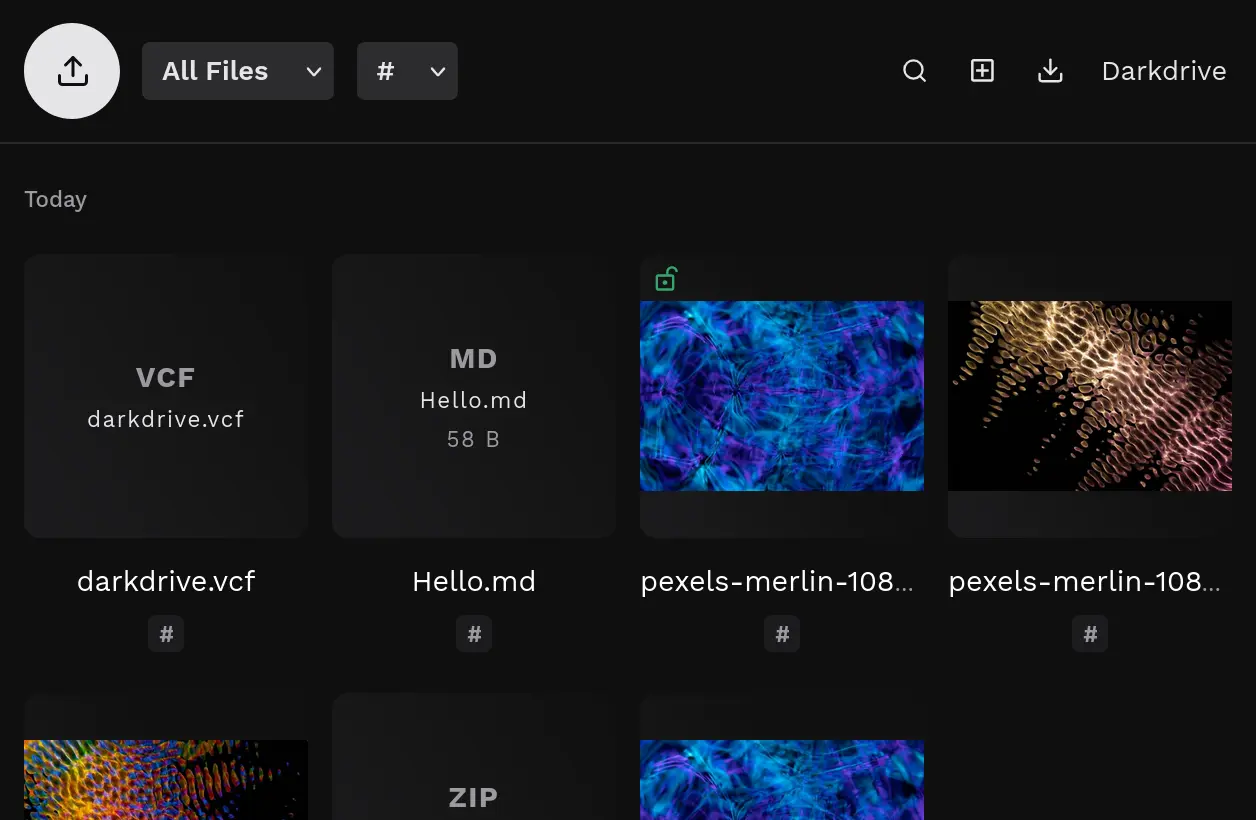
Darkdrive User Interface

End-to-End Encryption

Secure upload and complete encryption of all files and filenames. Only your key can decrypt your data. Ideal for confidential content.

Organic Structuring

Organize your files with tags instead of rigid folder hierarchies. Combine them flexibly by project, topic, or client and find everything in seconds.

Curated Features

Store all common file formats—from mobile devices or via drag & drop. Search, delete, and export your data at any time. Securely share selected files via a link.

Managed Darkdrive
(Comfort)

We operate your Darkdrive instance on high-performance servers in an ISO/IEC 27001:2022 certified data center in Germany. Includes 1 TB of storage.

Monthly €25 plus VAT
Subscribe

Total €29.75 incl. 19% VAT per month. Your Darkdrive is usually ready within a few hours. Use your-name.darkdrive.de or your own domain. Cancellable monthly.

Self-Host Darkdrive
(Control)

Use Darkdrive independently on your own web space. Choose the server location and performance yourself. Includes automatic updates and technical support.

Annually €99 plus VAT
Buy

Total €117.81 incl. 19% VAT. You receive the Darkdrive web app for one year for one domain or local instance. Compatible with common web servers from PHP 8.1 and ready in one minute.

This is how Darkdrive works

Can Darkdrive see my files?
No. Files and filenames are encrypted directly upon upload with AES-256-GCM. Without your password, neither we nor any third parties can read the content.
How secure is it really?
Darkdrive uses AES-256-GCM encryption, split-key authentication, CSRF protection, rate limiting, strict Content Security Policies, and automatic memory zeroing. Only with complete, unauthorized server access could data be intercepted during upload or viewing.
Can my password be changed?
Yes. The decryption password can be changed via Emergency Mode, which decrypts all files and filenames and re-encrypts them with the new password. This function is directly accessible via the server in the Self-Host plan; in the Managed plan, it can be activated upon request.
What happens if I lose my password?
Your password is the only key to your data. Since it is not stored anywhere—neither in plain text nor in a derivable form—your files cannot be recovered without the password. We therefore recommend creating regular backups using the export function.
How do I protect my data?
Keep your decryption password in secure locations only. Sessions expire automatically after 12 hours; manually logging out will immediately remove cached data.
What file types can I upload?
Darkdrive supports over 80 file types across nine categories: images (JPG, PNG, GIF, WebP, SVG, AVIF, HEIC, etc.), audio (MP3, FLAC, OGG, WAV, etc.), video (MP4, MKV, MOV, WebM, etc.), documents (PDF, DOCX, XLSX, PPTX, ODT, etc.), archives (ZIP, RAR, 7z, TAR, etc.), text and code (TXT, MD, CSV, JSON, PY, JS, etc.), fonts, contacts (VCF), and design files (PSD, Sketch, Figma, etc.).
What preview features are available?
Images, videos, and audio can be viewed or played directly in the browser. PDFs open natively in the browser, and office documents receive an encrypted preview of the first page. Audio files automatically detect cover images within the same tag and display them as thumbnails. Encrypted thumbnails are generated automatically for all supported file types.
Can files be edited?
Yes. Text-based files such as TXT, MD, CSV, JSON, HTML, CSS, and numerous programming languages can be edited directly in the detail view, provided they are smaller than 2 MB. Changes are automatically re-encrypted on save. New text-based files can also be created directly.
How do I use tags?
Tags allow thematic organization of files. Multiple tags can be assigned to each file, and the file overview can be filtered by individual tags. Using multi-select, multiple files can be tagged at once. Entering a tag again removes it. All tags are stored encrypted.
Can I share files?
Yes. Individual files can be shared as a decrypted copy via a temporary link. Access can be revoked at any time. The original file remains fully encrypted throughout – only the shared copy is accessible without a password.
How do I export my files?
Individual files can be downloaded directly from the detail view. For a full export, a decrypted ZIP archive containing all files – or files filtered by tag or type – can be downloaded. Using multi-select, specific files can also be exported as a bundle.
How do I sync my files?
A separate synchronization tool enables automatic two-way file sync. New or modified files are downloaded as decrypted backups, and files placed in an upload folder are automatically uploaded and encrypted.
Does Darkdrive work on mobile?
Yes. The interface is fully responsive and optimized for mobile browsers. Using the "Add to Home Screen" feature, Darkdrive can be used like a native app.

Darkdrive Light

Your Darkdrive on certified shared servers in Germany. With 100 GB of storage. Try it free for 14 days.

Monthly €15 plus VAT
Subscribe

Total €17.85 incl. 19% VAT per month. Your Darkdrive is usually ready within a few hours. Use your-name.darkdrive.de. Cancellable monthly.